Printing
System Architecture
The printing system bridges the web application and local factory printers using a database-polling architecture.
Flow: Web Application (CodeIgniter 4) → Insert Row into print_job Table → BarTender Integration (Local Windows Server) monitors database → BarTender Automation Engine populates label template → Print Maestro manages print queue → Zebra ZD421/ZT411 Printer
1. Print Job Database Table
description: Comprehensive documentation on the automated label printing system using BarTender Software and database-triggered printing.
Overview
The Printing System enables automated label printing for various production processes at Shelter Enterprises. The system uses BarTender Automation Suite from Seagull Scientific (https://www.bartendersoftware.com/) to monitor a SQL database table and automatically print labels as new records are inserted. This integration eliminates manual label creation and ensures consistent, accurate labeling across all manufacturing operations.
Bartender Software (Point of Contact)
Adam Egert
SSE Technologies (Reseller)
Email: [email protected]
Phone: 516-872-7000 x223
Mobile: 516-902-3762
Fax: 516-872-9074
Address: 791 Meacham Avenue, Elmont, NY 11003
Website: www.ssetechnologies.com
Purpose
The Printing System streamlines production workflows by:
- Database-triggered printing - BarTender monitors the print_job table and automatically prints new rows
- Multi-printer support - Routes jobs to appropriate Zebra printers based on print type
- Label template management - Pre-formatted label designs in BarTender ensure consistency
- Inventory integration - Automatically deducts stickers and bags from inventory when print jobs are created
- Sequential numbering - Tracks and assigns sequential sticker numbers within jobs
- Resend capability - Allows reprinting labels if originals are damaged or lost
- Multiple label types - Supports EIFS, Line, Shape Mold (BuildBlock/CreteHeat), Sill Seal Boxing, and custom labels
System Architecture
Web Application (CodeIgniter 4) -> Insert Row into print_job Table -> BarTender Integration (SEI APP1 Server) monitors database for new rows -> BarTender Automation Engine populates label template with data -> Print Maestro manages print queue -> Zebra Printer -> Printed Label
Currently, there is one server running Bartender: SEI-APP1
Key Components
1. Print Job Database Table
Table: print_job
Core fields that drive the printing process:
id: Primary keylabel_name: The BarTender template name to use (matches the.btwfile)copies: Number of identical labels to printprint_type: Integer (0-5) determining which printer/queue the job is routed tojob_id: Foreign key linking to the parent job
Type-Specific Fields:
- EIFS:
lot_number,size_value,size_numerator,size_denominator, sequential numbering (size_count,size_total,job_count,job_total),pcs_per_bag,customer(12 char max),sales_order,bag_type(20 char max). - Shape Mold:
part_type,part_number,thickness,piece_count,operatorinitials,shift,web_location(BuildBlock),production_date(BuildBlock). - Line Sticker:
pagesand custom formatting fields.
2. BarTender Integration Files
The local Windows Server in the factory (c:\Users\jmess\Downloads\Label Printing Files(1)) hosts the integration files that bridge the database to the printers:
Integration Files (.btin):
These files configure the database polling logic and printer routing.
Robo Pack Integration.btinShape Mold Integration.btinPrint Stickers Function.btin
Label Templates (.btw):
These are the visual BarTender designer templates. The label_name in the database must exactly match the base name of the .btw file (or routing logic within the integration).
FullLot.btwdivider.btw- Additional templates are located in subdirectories such as
EIFS,ShapeMold, andSillSeal.
Web Application Integration
Core fields that drive the printing process are organized by label type. Common fields include id, label_name (BarTender template name), copies (number of labels), print_type (0-4 determining printer/queue), job_id (foreign key), timestamps, locationID(foreign ID -> Location Table).
EIFS-Specific Fields: lot_number, size dimensions (value, numerator, denominator), sequential numbering (size_count, size_total, job_count, job_total), pcs_per_bag, customer (12 char max), sales_order, bag_type (20 char max).
Shape Mold-Specific Fields: part_type, part_number, thickness, piece_count, operator initials, shift, web_location (BuildBlock), production_date (BuildBlock).
Line Sticker-Specific Fields: pages and custom formatting.
Location Table Fields: id, building_name.
2. BarTender Automation Suite
Installed Location: SEI-APP1 local server instance (connected to realVNC) & PLANT 05 computer in shipping office (connected to realVNC)
The BarTender suite consists of three critical applications:
Administration Console - Manage integrations, licenses, and system status. First stop for troubleshooting. View which integrations are running, check license status, start/stop services, view system logs.
Integration Builder - Create and configure database-triggered print automations. Current setup: Single integration watches print_job table, polls database every few seconds for new rows, maps data to label template fields, submits job to appropriate printer queue based on print_type.
Print Maestro - Advanced printer and print queue management. Cancel stuck jobs, manage printer status, view all connected printers, monitor printer health, view active print queue, diagnose communication issues.
3. Web Application Integration
Primary API Controller: App\Controllers\Api\PrintJob
Key Endpoints
send()Creates EIFS Robo Pack print jobs (automated EIFS bagging). Validates parameters, finds EIFS bag type, calculates sequential numbers, creates EIFS bags, removes inventory, and inserts aprint_jobrecord withprint_type = 0.mass_send()Creates multiple EIFS print jobs in batch (full line EIFS). Accepts an array of print jobs, loops through each, incrementsjob_countacross all sizes, and setsprint_type = 1.send_line()Creates custom line sticker print jobs.send_shape_mold()Creates BuildBlock or CreteHeat labels with job context. Retrieves part/job/operator/shift data, formats it, and setsprint_typebased on build or crete (2or3).send_manual_shape_mold()Creates manual shape mold labels. Simple print job creation withprint_type = 4for the upstairs printer.sill_seal_labels()Creates print jobs for Sill Seal stickers usingprint_type = 5. Resolves the label name format based on the package type (box or roll) and fraction conversion.get_label_info()Retrieves print job status and history for an EIFS job. Returns data on already printed jobs and targets that are pending. Primary API Controller: App\Controllers\Api\PrintJob
Key Methods:
- send() - Creates EIFS Robo Pack print jobs (automated EIFS bagging)
- mass_send() - Creates multiple EIFS print jobs in batch (full line EIFS)
- send_line() - Creates custom line sticker print jobs
- send_shape_mold() - Creates BuildBlock/CreteHeat labels with job context
- send_manual_shape_mold() - Creates manual shape mold labels
- get_label_info() - Retrieves print job status and history for a job
Label Types
1. EIFS Labels
Templates:
- LotStickerEPS (without fraction)
- LotStickerEPSFrac (with fractional size)
- LotStickerGPS (without fraction)
- LotStickerGPSFrac (with fractional size)
- Drainage variants automatically append DB to label name
Information Displayed: Lot number, size (e.g., 2 inch or 2 1/4 inch), sequential numbering (size count/total, job count/total), pieces per bag, customer name, sales order number, bag type.
Print Types:
- Type 0 (Robo Pack automated station)
- Type 1 (Manual EIFS)
2. Shape Mold Labels
Templates:
- BuildBlock (Portrait & Landscape)
- CreteHeat (Portrait & Landscape)
Information Displayed: Part type, part number, thickness, piece count/bundle (CreteHeat), web location (BuildBlock), production date (BuildBlock), operator initials, shift, lot number (date + shift).
Print Types:
- Type 2 (BuildBlock downstairs)
- Type 3 (CreteHeat downstairs)
- Type 4 (Manual shape mold upstairs).
3. Sill Seal Boxing Stickers
Templates:
- SillSealBox (3.5, 5.5, 7.5)
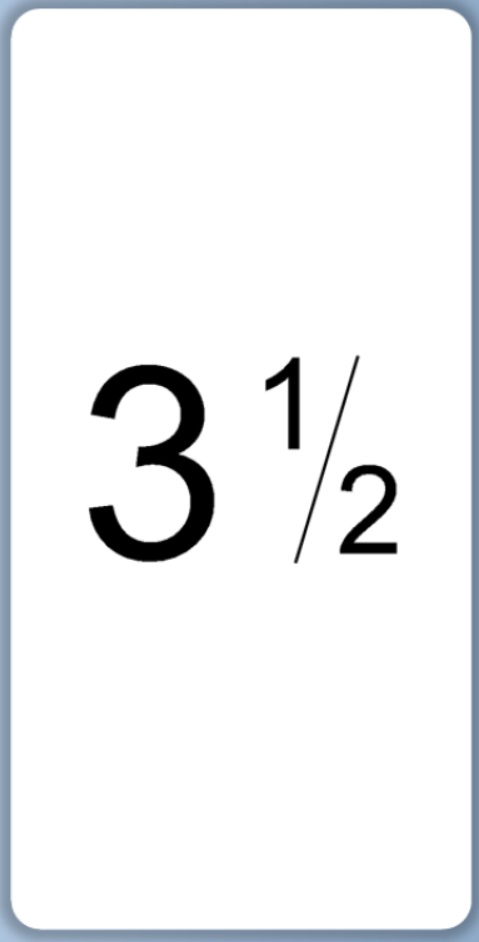
- SillSealRoll (3.5, 5.5, 7.5)

- SillSealRoll (3.5, 5.5, 7.5)
Purpose: Custom labels for sill seal boxing processes.
Print Types:
- Type 5 (Sill Seal)
Workflow Example: Robo Pack EIFS Printing
- Operator scans EIFS job at Robo Pack station
- Web app displays print targets (sizes/quantities needed)
- Operator clicks Print for a target size
- AJAX call to /api/print_job/send
- Backend validates job and EIFS bag type
- System calculates sequential numbers
- Creates EIFS bags in inventory
- Removes stickers and bags from inventory
- Inserts row into print_job table
- BarTender Integration detects new row
- Bartender will check the locationID to determine where it prints.
- Populates LotStickerEPS/GPS template
- Submits to Zebra printer
- Labels print at Robo Pack station
- Operator applies labels to EIFS bags
Access Requirements
Print Job Creation: Admin or Factory Admin role required for most printing operations. Some endpoints accessible to authenticated users with appropriate job permissions.
BarTender Administration: Physical access to PLANT 05 computer, administrative credentials for BarTender software, knowledge of database connection settings.
Helper Functions
Located in src/app/Helpers/print_job_helper.php:
get_eifs_target_print_label(): Determines template name.format_printed_jobs(): Transforms query results.find_starting_number(): Calculates next sequential number for padded displays.find_print_job_count(): Returns total labels for a job.delete_previous_print_job(): Removes old jobs during a resend operation to maintain clean tables.get_eifs_target_print_job(): Generates print job data structure.
Data Flow and Integration Points
Inventory Management
Print job creation triggers inventory deductions.
- Stickers are removed from the sticker table (
remove_sticker()). - Bags are removed from the bag table (
remove_bag()). - EIFS bags are created as new records in the
eifs_bagtable (make_eifs_bags()). Note: Inventory checks are performed, but print jobs will still succeed even if there is insufficient inventory.
Job Tracking & Sequential Numbering
Print jobs are linked to parent job records via job_id.
size_counttracks the incrementing number within a specific size.job_counttracks the overall job increment number. Both are padded to 3 digits. Resend operations can intentionally create gaps in numbering.
Notification System
Resend operations and "Block not found" errors automatically trigger system notifications to alert administrators of anomalies.
Data Flow and Integration Points
Inventory Management: Print job creation triggers inventory deductions. Stickers removed from sticker table (Printed Sticker type). Bags removed from bag table (matching type or default). EIFS bags created as new records in eifs_bag table.
Job Tracking: Print jobs linked to parent job records via job_id. Enables tracking of total labels printed per job. Sequential numbering ensures proper order. Resend functionality maintains numbering continuity.
Notification System: Resend operations create notifications. Block not found errors trigger notifications. Admin users receive alerts for printing issues.
Location: The location table links to print_job via foreign key. Each building is considered a location. Each respective Bartender instance will check the location before printing. This will ensure they print only ones designated for their building.
Known Limitations
- Database Polling: BarTender polls database rather than receiving push notifications (minor delay)
- Manual Deletion: Print job rows may need manual cleanup if not configured for auto-deletion
- Printer Downtime: If printer is offline, jobs queue up and print when restored
- Template Changes: Label template modifications require BarTender Integration Builder access
- Character Limits: Customer names truncated to 12 chars, bag types to 20 chars for label space
- Bartender has limitations printing to network printers. New Buildings may need their own implementation of Bartender running.
- Depending on Zebra printer, it may print at different demensions. Adjusting the templates will be necessary.
Support and Troubleshooting
BarTender Tech Support: (425) 274-3610
SSE Technologies (Reseller): Jonathan Negron SSE Technologies p: 516-872-7000 x230 f: 516-872-9074 a: 791 Meacham Avenue, Elmont, NY 11003 w: www.ssetechnologies.com e: [email protected]
Common Issues:
- Labels not printing - Check Administration Console (ensure integration is running), verify printer status in Print Maestro, confirm database connection in Integration Builder, check print_job table for new rows. Also, check if location_id in print_job is not null.
- Wrong printer receiving jobs - Verify print_type field is set correctly, check Integration Builder routing logic, confirm printer queue configuration
- Missing label data - Verify all required fields populated in print_job row, check BarTender template field mappings, review Integration Builder data mapping configuration
- Labels will start to strech making it un-readable. Open Bartender Designer and scale everything back to its original form.
Front-End Behavior
The printing system integrates into production workflows through dedicated UI pages. Print jobs are triggered via AJAX API calls.
When utilizing a kiosk, the location will be predetermined. Manually printing will need user input of where to print to. If the location isn't set, the user will be prompted to select a location (currently new or old building). I believe the Kiosks in the new building are not defaulted to the "new building".
Robo Pack Interface (src/public/js/robopack/robo_pack_in_progress.js): Displays EIFS bag targets in Tabulator table. Green rows = printed, white = pending. Editable cells for quantity, type, bag, size, fraction, pcs/bag, drainage. Print button triggers /api/print_job/send. Resend button for reprinting. Loading overlays during AJAX operations.
Shape Mold Interface (src/public/js/shape_mold/shape_mold_in_progress.js): Manual printing via form (part type, shape mold type, copies). Job-based printing via part table Print button. Triggers /api/print_job/send_shape_mold or send_manual_shape_mold.
Full Line EIFS (src/public/js/eifs/full_line_labels.js): Batch print interface. Multiple rows submitted via /api/print_job/mass_send. Validates no duplicate size/type combinations.
Back-End Logic
API Controller: App\Controllers\Api\PrintJob
send() - EIFS Robo Pack: Validates parameters, finds EIFS bag type, calculates sequential numbers, creates EIFS bags, removes inventory, inserts print_job record with print_type=0.
mass_send() - Batch EIFS: Accepts array of print jobs, loops through each, increments job_count across all sizes, sets print_type=1.
send_line() - Line Stickers: Creates print job with custom fields, no inventory deduction.
send_shape_mold() - Job-Context: Retrieves part/job/operator/shift, formats data, sets print_type based on build/crete (2 or 3).
send_manual_shape_mold() - Manual: Simple print job creation, print_type=4 for upstairs printer.
get_label_info() - Status: Returns printed jobs and pending targets for a job.
Helper Functions (src/app/Helpers/print_job_helper.php):
- get_eifs_target_print_label() - Determines template name
- format_printed_jobs() - Transforms query results
- find_starting_number() - Calculates next sequential number
- find_print_job_count() - Returns total labels for job
- delete_previous_print_job() - Removes old jobs when resending
- get_eifs_target_print_job() - Generates print job data structure
Developer Notes
- BarTender Integration Setup: Configure the database connection string directly within the Integration Builder software (
.btinfiles). Set the trigger to monitor theprint_jobtable forINSERToperations. Map the SQL columns to the.btwtemplate variables. - Label Templates: Design changes are made in BarTender Designer (
.btw). Use the database connection wizard to add field placeholders. Some templates utilize embedded VB Script for dynamically calculated fields. Ensure the template dimensions exactly match the physical Zebra label stock. - Error Handling: All printing API operations return standard JSON validation errors (
failValidationErrors()) and are logged to the system file vialog_message(). - Performance: The
print_jobtable is indexed onjob_id,label_name, andsizefields to optimize theget_label_info()lookup queries. Monitor the BarTender polling interval to balance database load against print latency.